


When someone searches Google for a plumber or a hair salon nearby, your star rating and your number of reviews usually sit right next to your business name. The way to get more Google reviews is to ask every customer after every job and send them a direct link to leave one.
So the work lies in turning that ask into a weekly habit. It also has to stay inside Google’s review rules and UK consumer law, which both ban fake reviews and restrict rewards for reviews.
TL;DR on getting more Google reviews
These 5 points cover how to increase Google reviews without putting your profile at risk:
- Ask every customer for a review, including the ones you aren’t sure were happy.
- Send your Google review link or QR code as soon as the job is done.
- Reply to every review, good or bad, in a calm and specific way.
- Never offer payment, discounts or gifts for reviews, because Google bans rewards and UK law bans fake or hidden-reward reviews.
- Report a review to Google only when it breaks Google’s policies, because Google won’t remove a review just for being negative.
Why more Google reviews matter
Your reviews sit on your Google Business Profile, which is your free business listing on Google Search and Maps. Google’s help page on local ranking says more reviews and positive ratings can help your business’s local ranking, meaning where you appear in the map results for nearby searches. Our article on whether Google reviews help SEO covers that ranking effect in more detail.
Google counts reviews as part of prominence, which is how well known a business is. It also weighs distance from the person searching and relevance, which is how well your profile matches the search.
Reviews also shape which business a customer picks. BrightLocal’s 2026 survey of 1,002 US adults found these two habits:
- 74%look for reviews written in the last 3 months.
- 80%are likely to use a business that responds to all of its reviews.
So a steady run of new reviews, each with a reply, keeps your profile current for anyone comparing you with the business down the road. A pattern we see often is a business with a decent review count whose newest review is more than a year old, because the owner asked everyone in one big push, then stopped.
What Google and UK law allow
Google’s review policies and UK law agree on the main points. You can ask real customers for honest reviews. You can’t fake, buy or filter them.
This table lists what Google’s policies and UK law allow and what they don’t:
| Allowed | Not allowed |
|---|---|
| Asking every customer for an honest review | Offering payment, discounts, free goods or free services in return for posting, changing or removing a review |
| Sharing your Google review link or QR code | Asking only the customers you expect to be happy, which is known as review gating |
| Reminding customers who haven’t left a review yet | Reviews from current or former staff, or reviews of your own business |
| Replying publicly to every review | Buying reviews or writing fake ones |
| Reporting reviews that break Google’s policies | Discouraging negative reviews, or editing, holding back or removing them where you show reviews |
Under the Digital Markets, Competition and Consumers Act 2024 (DMCC Act), fake reviews are a banned practice in the UK. The Competition and Markets Authority (CMA), the UK’s competition and consumer regulator, says in its fake reviews guidance that the law bans both posting a fake review and getting someone else to write or post one.
The same guidance says a business must tell people when a review was incentivised, which means rewarded in some way. Google goes further than UK law, because its contribution policy bans incentives for reviews outright, so a discount for a Google review breaks Google’s rules even if you tell people about it.
This is a general summary of the rules and can’t replace legal advice. If you work in a regulated profession, such as dentistry or law, check your regulator’s guidance on reviews as well.
Free SEO audit
Is your profile ready for more reviews?
Your free SEO audit grades your Google Business Profile, your reviews and your map position in under a minute.
Get your Google review link ready
A direct review link takes customers straight to your profile to leave a review, so they don’t have to search for your business first. Google’s guide to getting reviews says you can ask customers to visit a Google link or scan a QR code, which is a square barcode that opens a link when someone points their phone camera at it.
Look for the “Ask for reviews” option when you manage your verified Business Profile on Google Search or Maps. It gives you the link to copy and a QR code you can share. If your business doesn’t have a verified profile yet, start with our guide on how to set up your Business Profile.
Open the link on your own phone once to check where it lands. Then save it in a short text message template on the work phone, so anyone who finishes a job can send it in seconds.
How to ask for Google reviews
Asking is the part of the process you control most. In the same BrightLocal survey, 83% of people who were asked to leave a review went on to leave one.
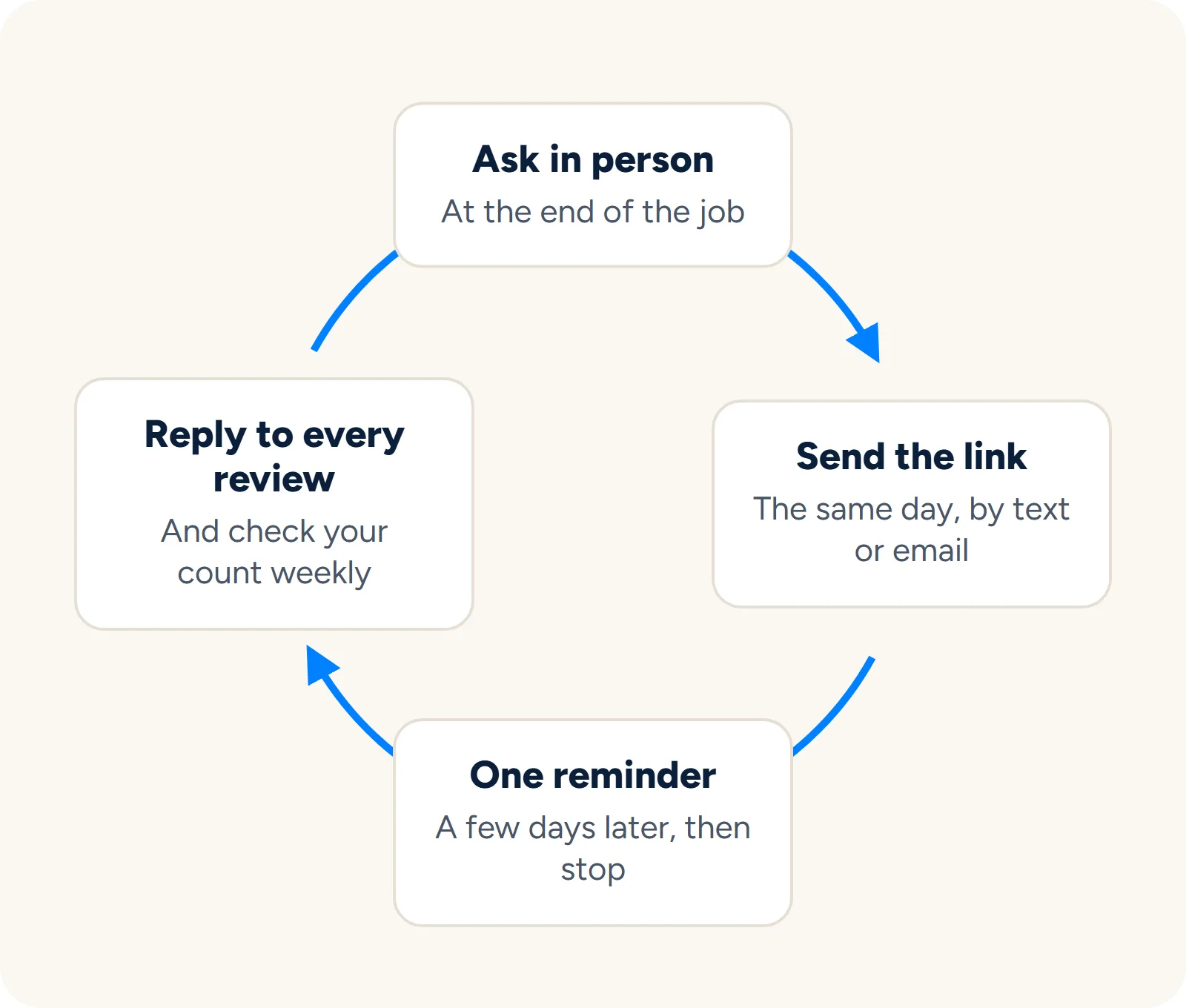
These 5 steps turn asking into a routine your business can repeat every week:
1. Ask every customer at the end of the job
Ask every customer, including the ones you’re unsure about. Google’s contribution policy bans selectively asking for positive reviews, so a routine that skips anyone who seemed unhappy breaks Google’s rules.
Ask once the work is done and the customer can judge it. A plumber can ask after showing the customer the repaired boiler running, a salon can ask at the till, and an online shop can send the request once the order has arrived.
2. Ask in person, then send the link
Keep the spoken ask short and personal. Something like “Would you mind leaving us a Google review? I’ll text you the link now.” is all you need to say.
Then send the link the same day by text or email, while the job is still fresh in their mind. Leave out star ratings and any request for a 5-star review, since the CMA guidance allows requests that don’t try to decide what customers write.
3. Make it one tap
Put the link or QR code wherever customers already look during or after a purchase. These are the places where it’s easiest for customers to use:
- Receipts and invoices: Print the QR code or the link in the footer, so every customer leaves with it.
- Counter or reception desk: A small printed card with the QR code lets walk-in customers scan it while they pay.
- Booking confirmations: Add the link to the confirmation or follow-up email your booking system sends.
- Email signature: Put the link under your name, so every email to a customer includes it.
A QR code suits places where the customer is standing in front of you. A link suits anything they read on a phone or computer.
4. Send one polite reminder
Google’s guide to getting reviews suggests reminding customers to leave them. One reminder a few days after the first message gives a customer who meant to leave a review and forgot a second chance. After that, stop, because the choice is theirs to make.
5. Build it into your weekly routine
Decide who asks and when. In a small team, that might be the person who finishes the job or the person who takes payment.
Check your review count on the same day each week. If new reviews have stopped arriving, check first whether the requests are still going out.
Free kit
Want the exact words to send?
Our free Review Booster Kit fills in WhatsApp, text and email requests with your review link and makes a QR poster, all within Google's rules.
Reply to every review
Google’s help page on replying says your reply appears publicly under the customer’s review, and the reviewer gets a notification when you post it. As the survey figures above show, replying to all of your reviews matters to people choosing a business. Generic or templated replies put off 50% of the people BrightLocal surveyed, so write each reply for the review in front of you.
For a positive review, keep the reply short and personal:
- Thank them by name: Use the name shown on the review, so the reply reads as written for that customer.
- Mention the job: Refer to the work they describe, such as the boiler repair or the colour appointment.
- Sign off as a person: Add your first name, so the customer knows who replied.
For a negative review, remember that future customers will read your reply as well as the reviewer:
- Stay calm: Wait until you can reply without anger, and keep to the facts of what happened.
- Apologise where it’s fair: If something went wrong, say so plainly and say what you’ve changed.
- Take it offline: Give a phone number or email address, so the customer can contact you to sort it out.
- Keep details private: Leave out the customer’s address, job details or anything else they didn’t share in the review.
When a review is fake or breaks the rules
Google removes a review only when it breaks Google’s policies. Its help page on removing reviews says you can report one from your Business Profile or through Google’s Reviews Management Tool, choosing the reason that fits.
Google then checks the review against its policies, which typically takes several days. If Google finds no breach, the review stays up, so keep a screenshot of each review you report and note the date.
Google also asks businesses not to report a review just because they disagree with it. A negative review that follows the rules will stay on your profile, so reply to it using the steps above.
Work with the founders
Reviews are one part of how Google ranks you
We work on the rest too, from your Business Profile and local listings to the pages on your site. You deal with the two founders from day one.
FAQ about getting more Google reviews
These answers cover questions small business owners often ask about Google reviews:
Can I reply to reviews before my profile is verified?
No. Google says you must verify your business before you can reply, so verify your profile first, then reply to any reviews that are already waiting.
Can I ask a customer to change a negative review?
You can reply, put the problem right and tell the customer what you’ve done. Whether they change the review is their decision, and offering anything in return for changing it breaks Google’s rules.
What if a customer can’t find where to leave a review?
Send them your direct review link again, or let them scan your QR code if they’re with you. If the link still doesn’t work, test it on your own phone and copy it again from the “Ask for reviews” option.
Final thoughts on getting more Google reviews
Asking for a review takes one sentence in person and one short text afterwards. The count builds slowly, so start the routine with your next customer and keep it going every week.
Free SEO audit
See where your reviews and profile stand
Answer a few quick questions and get your free SEO audit, with the first things to fix for more calls from Google.
If you’d like help with the rest of your local SEO, Sandcrowd works only with small and local businesses. You work directly with our two founders on your Google Business Profile, local listings and website pages.